The engine answer
The collected technical sources attribute Onimusha: Way of the Sword to CAPCOM's RE Engine. The PC release also includes an in-game benchmark according to the captured technical report. Engine identity is only one part of the performance picture, so it should not be used by itself to predict how the game will run on a particular computer.
RE Engine is the technology attribution supported by the source set. Actual frame rate still depends on the complete hardware configuration, resolution, quality settings, upscaling choice, drivers, and the demands of a particular scene. A useful technical guide separates those variables instead of treating the engine name as a performance guarantee.
What the built-in benchmark does
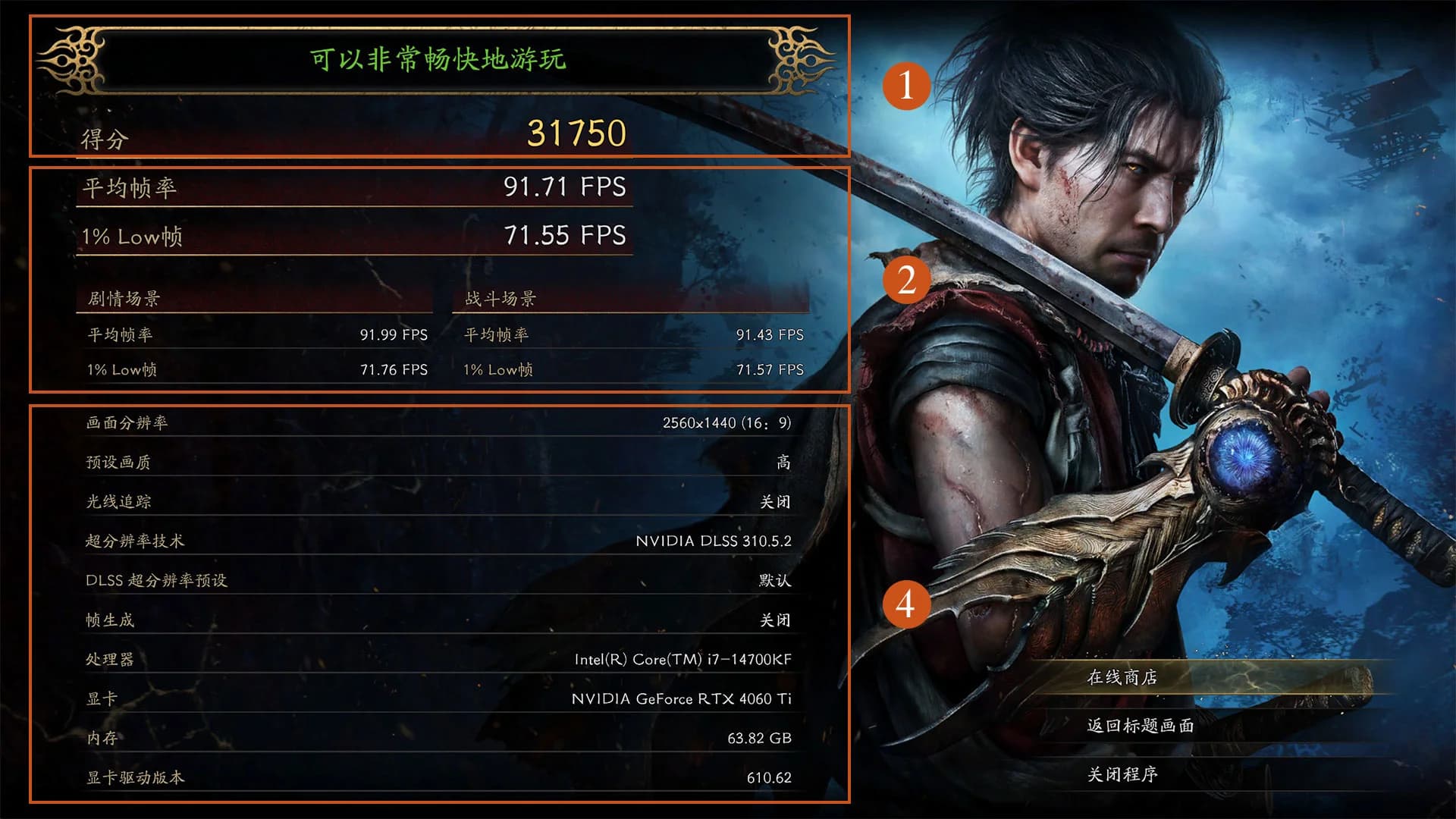
The captured report describes a benchmark lasting roughly five minutes. It combines real-time cutscenes with a gameplay section that places more pressure on the CPU. That mix is useful because cinematic rendering and active gameplay can stress a system in different ways.
A built-in benchmark provides a repeatable workload before or alongside normal play. Players can use it to compare settings on the same machine, observe where performance changes, and decide whether a lower quality preset or an upscaling mode provides a better balance. It remains a sample rather than a perfect prediction of every stage and boss fight.
When interpreting a result, keep the test conditions attached. Resolution, preset, ray tracing state, upscaling, frame generation, and any frame cap can materially change the number. A score without its settings is not useful for comparing two systems or diagnosing a bottleneck.
What the 31-CPU test actually shows
Tom's Hardware tested 31 processors at 1080p Ultra with ray tracing, DLSS, and FSR disabled. The test system used an RTX 5090 to reduce the chance that the graphics card would hide differences between CPUs. This is a controlled comparison designed to study processor behavior, not a typical shopping recommendation for the entire PC.
The report characterizes the game as more GPU-heavy than CPU-heavy under its broader observations. Even so, the benchmark includes a more CPU-intensive gameplay segment, which helps reveal differences that a simple cutscene loop might miss. Both statements can be true because a game can usually be limited by graphics performance while still containing scenes where processor choice matters.
One tested Ryzen 7 2700X system approached 90 frames per second at 1080p Ultra when paired with that RTX 5090. That result must not be copied into a minimum-requirements claim. It demonstrates behavior inside a specific test configuration whose graphics card and settings were chosen for comparative analysis.
Captured minimum target
The collected requirements material reports a minimum target of 1080p at 30 frames per second on the Low preset. The associated processors are an Intel Core i5-8400 or AMD Ryzen 3 3100, with 16 GB of memory. The listed graphics options are a GeForce GTX 1660 with 6 GB or a Radeon RX 5500 XT with 8 GB.
This is a performance target, not a promise that every machine containing one listed component will behave identically. Memory configuration, storage condition, background software, thermal limits, and the rest of the hardware can affect the result. Laptop parts with similar names can also operate differently from desktop versions.
Before turning this snapshot into a final purchase table, confirm the current Steam store requirements. Store listings can change close to release or after patches, while the local evidence is dated September 4, 2026. The current page should be treated as a sourced snapshot rather than an always-current hardware database.
Captured recommended target
The same material reports a recommended target of 1080p at 60 frames per second on the Medium preset. It lists an Intel Core i5-10400 or AMD Ryzen 5 3600, 16 GB of memory, and either a GeForce RTX 2060 Super with 8 GB or Radeon RX 6600 with 8 GB. The summary assumes support from an upscaling option such as DLSS 4.x or FSR 3.1.
That upscaling condition is important. A performance target reached with reconstructed resolution is not directly comparable to native rendering at the same output resolution. Players comparing reviews or benchmark results should check whether the test used native resolution, quality upscaling, balanced upscaling, or another mode.
Recommended also does not mean maximum settings. The captured target explicitly references Medium at 1080p, so it should not be paraphrased as an Ultra or high-resolution guarantee. Matching a listed processor and graphics card gives a useful reference point, but the documented target and assumptions must stay visible.
CPU and GPU expectations
The 31-processor test helps explain why a powerful graphics card was used. If the test had become GPU-limited on every processor, many CPUs could have produced similar results and hidden their relative differences. The RTX 5090 was therefore part of a test method, not evidence that players need that card.
For a normal system, the graphics card may become the limit sooner, especially as resolution or visual quality rises. Lowering a graphics-heavy setting or changing upscaling can then have more effect than replacing a processor. In a CPU-heavy scene, reducing resolution may produce little improvement because the processor is preparing the workload.
The benchmark's different segments can help identify that distinction. If one scene responds strongly to resolution changes and another barely moves, the bottleneck may be changing through the run. Treat the final average together with minimums and visible frame-time behavior if those metrics are available.
A practical benchmark process
Start with the preset closest to the captured target for your hardware tier. Record resolution, preset, upscaling mode, ray tracing state, and the benchmark result so the next run is comparable. Change one major setting at a time, because changing several at once makes it difficult to know which adjustment helped.
Watch the gameplay section as well as the overall average. A smooth cinematic segment can hide a heavier combat or traversal moment, while one demanding scene can reveal a limit that matters during play. Choose settings around the least acceptable section, not only the highest number displayed during the run.
After selecting a benchmark configuration, verify it in the actual game. Boss effects, dense encounters, streaming between areas, and longer sessions can behave differently from the fixed test. The built-in tool is a strong starting point, but real play remains the final check for comfort and stability.
What review reports can and cannot prove
One captioned PC review in the source set describes stable performance without observed hitching or visual bugs. The reviewer also states that the test used a powerful computer. That report is useful evidence for the reviewed setup, but it cannot establish identical behavior across minimum, recommended, laptop, or unusual hardware configurations.
A separate video associated with the engine topic had no usable caption track. It was not used to fill gaps in engine or performance claims. This source boundary prevents visual impressions or an unavailable transcript from being turned into unsupported technical details.
Performance can also change through drivers and game updates. Any post-release claim about a current patch should cite that version and its test conditions, rather than silently combining it with the September 4 capture. Historical benchmark data stays useful when its date and setup remain attached.
Source snapshot and limits
This guide uses the September 4, 2026 local capture, including the Tom's Hardware CPU benchmark, the Steam product page, an Onimusha Guide requirements summary, and an Onimusha Fandom engine attribution. Captioned videos supplement the captured target descriptions and one high-end PC experience. The Steam listing should be checked again before making a time-sensitive hardware purchase.
Keep three evidence types separate. RE Engine attribution identifies the technology, official store requirements describe hardware targets, and third-party tests report results from particular systems. None can substitute for the others, and no single benchmark can promise identical performance for every player.