Onimusha: Way of the Sword was reported to use Denuvo Anti-Tamper for its PC release. That status matters if you are deciding whether the purchase fits your ownership or offline play preferences, but it does not establish the cause of a crash or a frame rate drop. Check the protection notice for the exact edition you intend to buy and evaluate performance separately on your own hardware.
Denuvo status and your PC purchase
Treat Denuvo as part of the PC purchasing decision before you begin troubleshooting graphics settings. If you only buy games without third party anti-tamper, the reported inclusion is a reason to pause that purchase until its current protection terms meet your preference. There is no need to justify that preference with a claim that every protected game performs badly.
The same principle applies in the other direction. A game running well on one computer does not answer another buyer's questions about activation, offline access, or long term ownership. Decide which of those conditions matters to you, then check that condition directly rather than using a performance anecdote as an answer to every DRM concern.
Keep the game, edition, and storefront together when reading a notice. A protection statement for one PC store should not automatically become a detailed policy table for Steam, Epic, and the Xbox PC edition. For a comparison of purchase options and their practical differences, begin with the Steam version and PC storefront guide.
Activation limits and offline expectations
Do not plan around an assumed daily activation allowance. A specific number of devices or activations needs an explicit current notice for this game and edition, not a rule remembered from another Denuvo release. If you regularly change hardware, reinstall Windows, or alternate between several computers, resolve that question before relying on the purchase for those uses.
Offline play also needs more detail than a simple yes or no label. Consider first launch, a later session without a connection, and a session after a major hardware or software change as separate situations to check. A successful offline session in one of those circumstances does not promise unlimited access under every other circumstance.
Before travelling, launch the owned game through its normal client while you have a working connection. Then test the actual offline arrangement you intend to use and confirm that your save opens successfully. Treat this as a check of your current setup, since one successful test cannot establish an indefinite future activation window.
If an activation or ownership message prevents launch, record its exact wording. Confirm you are using the account that owns the game and that the normal client can reach its services before making system changes. An explicit activation error deserves a different investigation from a black screen, a graphics driver reset, or a crash halfway through combat.
A crash is not a diagnosis of Denuvo
A game can close unexpectedly for many reasons, and the presence of anti-tamper does not identify which one occurred. Record whether the failure happens before the menu, while starting a new campaign, during a particular cutscene, or after sustained play. Those distinctions help you choose a useful next step instead of changing unrelated settings because a discussion thread names DRM.
The opposite shortcut is equally unhelpful. Meeting the recommended hardware specifications or owning a recent graphics card does not prove that a player cannot encounter a software fault. Take the symptom seriously, but keep the claimed cause separate until a reproducible test or specific error gives you a reason to connect them.
Frame rate drops and application crashes are different observations. A demanding scene that renders more slowly is not the same failure as an executable closing or the display driver recovering. Use the PC crash troubleshooting sequence when the application fails, and record frame pacing separately when the game remains running.
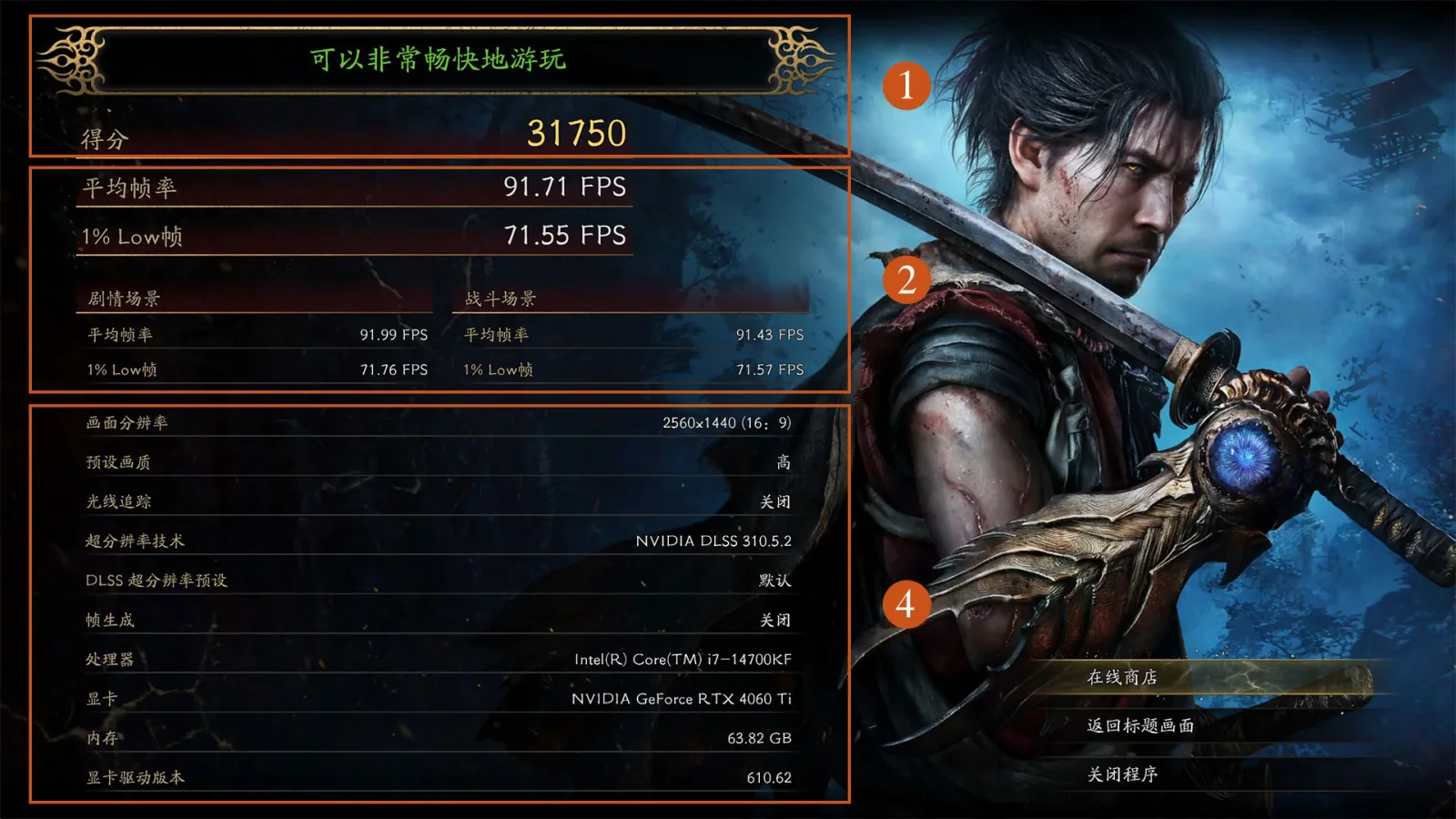
Build a useful performance comparison
Choose one repeatable area or benchmark run and keep the conditions steady. Use the same game build, graphics driver, resolution, preset, upscaling option, and background applications between attempts. If those conditions change together, an improvement tells you that the overall setup changed, not which component caused it.
Record both the typical frame rate and the moments when motion becomes noticeably uneven. An average can hide short interruptions that matter during a defensive exchange, while a single bad frame can exaggerate how the rest of a session feels. Describe the scene and action that trigger the problem so you can return to them after making one adjustment.
A comparison between a demo and the full campaign needs extra care. The applications can contain different content, builds, settings, or startup behavior, so a smoother demo does not isolate the effect of anti-tamper. Treat the difference as a reason to investigate the full game's setup rather than as a controlled experiment that has already identified the cause.
Claims about a particular percentage of performance loss require a comparable test that isolates the changed component. Two videos with different machines, scenes, drivers, or image settings cannot supply that comparison simply because one mentions Denuvo. You can still use those videos to understand how a configuration looks, but avoid turning their differences into a precise DRM penalty.
Hardware requirements and graphics settings
The PC requirements describe Windows 11, DirectX 12, 16 GB of memory, and installation on an SSD. The minimum hardware tier includes an Intel Core i5-8400 or AMD Ryzen 3 3100 and a GTX 1660 or Radeon RX 5500 XT. Treat the minimum tier as a starting requirement with its associated quality conditions, rather than a promise of high settings at any resolution.
The recommended tier lists an Intel Core i5-10400 or Ryzen 5 3600 with an RTX 2060 Super or Radeon RX 6600. Its performance target is tied to a particular preset, resolution, and use of upscaling, so removing those conditions changes the meaning of the recommendation. Higher texture settings, more demanding effects, and additional background work can change the workload your own computer must handle.
If your configuration is struggling, begin with a modest preset and a repeatable gameplay test. Change one expensive graphics setting at a time and keep a note of whether the problem is low frame rate, uneven pacing, or a complete crash. This approach produces a usable configuration without pretending that a graphics adjustment has removed or measured Denuvo.
Removal reports and modified executables
A report that protection has been bypassed is not the same as a publisher removing it from the purchased game. An official removal would concern the distributed product and its current update, whereas an unofficial modification concerns a different executable. Do not assume that a headline about one means your installed storefront copy has changed its protection terms.
There is no dependable removal timetable to use as a buying date here. A publisher's history with other titles does not create a commitment for this one, and an expected interval is not a scheduled update. If removal is your condition for purchase, wait for a clear change to the actual product notice or an applicable publisher announcement.
Replacing the executable also makes troubleshooting harder to interpret. You would no longer be testing the same files supplied and repaired by your game client, and compatibility with updates or added tools could differ. Establish a working unmodified installation first if your immediate goal is to diagnose crashes in a game you already own.
Mods and repair steps are separate decisions
A third party loader is not a required Denuvo repair. Some players use additional tools for camera, graphics, or other adjustments, but that does not prove the game needs those tools to work normally on every computer. Follow the PC mod setup and removal guide only when you deliberately want the relevant modification and understand its compatibility requirements.
If trouble began after adding a loader or changing its version, return to the previously working setup before investigating unrelated causes. Remove only the files you can identify as part of that modification and preserve saves and configuration backups. Repairing official game files and undoing manually added files are distinct actions, so do not assume one automatically completes the other.
For a new purchase, settle the ownership and activation questions first, then test the performance you actually need. For an existing installation, follow the error message and repeatable symptom through the appropriate troubleshooting steps. Keeping those decisions separate gives you a clearer answer than treating every PC concern as either proof for or proof against Denuvo.